How Many Access Points Do I Need?
How many access points do I need is the first question on almost every job, and the honest answer is that square metres alone will not tell you. Wall construction, the number of people and what they are doing matter just as much. This is how we work it out.
Why there is no number per square metre
You will find rules of thumb online that give one access point for a certain floor area. They are tidy and they are wrong often enough to be dangerous, because they assume every building is an open timber-framed box.
A wireless signal weakens every time it passes through something. Plasterboard on a timber or steel frame takes a little. Brick takes a lot. Concrete, stone and anything with metal in it, such as foil insulation, mirrored glass or a steel coolroom, takes most of what is left. Two buildings with identical floor area can need one access point or five.
The three things that set the number
When we design a network we are answering three questions, in this order.
- Coverage: can every place people use a device see an access point without a heavy wall in between? This is decided by the layout and the wall materials.
- Capacity: how many devices will be connected to each access point at the busiest moment, and what are they doing? Thirty people on video calls in one room need more than one access point, even though one would cover the room easily.
- Roaming: do neighbouring access points overlap enough that a phone can move from one to the next without the call dropping, but not so much that they interfere with each other?
What that looks like in real buildings
A small open-plan office or shop with framed walls is often well served by one or two access points. Add enclosed meeting rooms or a solid wall down the middle and the number goes up.
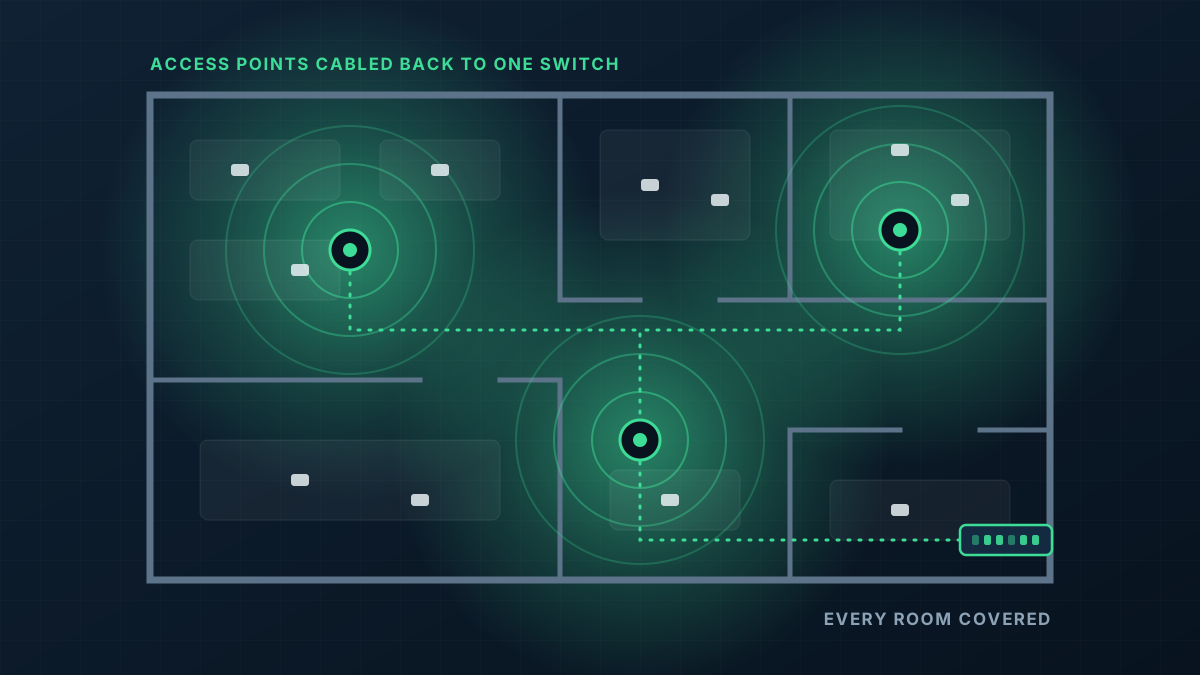
A single-storey house with brick internal walls usually needs more than people expect, because every room is its own little box. Placing access points in hallways and central living areas, where they can see into several rooms through doorways, gets the most from each one.
Warehouses are designed along the aisles rather than by area, since loaded racking blocks signal. Outdoor areas need access points close to where people actually are, because a phone has to send its signal back as well as receive one.
More is not always better
It is tempting to add extra access points for safety. Too many, too close together, all at full power, creates its own problem: they compete for the same airwaves and devices bounce between them. A good design uses enough access points to cover and carry the load, then turns each one down to suit its area.
That tuning is a large part of what separates an installed network from a box of access points. The hardware is the same either way.
How to get a real answer for your building
Send a floor plan, say what the walls are made of, mark where the internet comes in and where the WiFi lets you down, and tell us roughly how many people use it. For most homes and small offices that is enough for us to lay out access point positions and quote. Larger, multi-level and industrial sites are worth a visit. Our WiFi installation page explains how the job runs from there.