Warehouse WiFi for Scanners, Forklifts and Dispatch
Warehouse WiFi is a different problem from office WiFi: high roofs, long aisles, steel racking and stock that blocks signal differently every week. We design coverage aisle by aisle so handheld scanners, tablets and forklift terminals stay connected from receiving through to dispatch.
What goes wrong with WiFi in a warehouse
Scanners drop out mid-aisle
A scanner that loses its connection between racks means re-scans, walking back to find signal and pick errors that surface later.
It worked until the racks were full
Empty racking lets signal through. Pallets of stock, especially liquids and metal, do not. Coverage that tested well on day one can vanish at full capacity.
Office-grade gear on the roof
Access points designed to cover a ceiling-height room spread their signal the wrong way when they are mounted many metres up.
The yard and the dock were forgotten
Loading docks, hardstand and the gatehouse are where a lot of scanning happens, and they are often outside the coverage entirely.
Coverage that follows the aisles
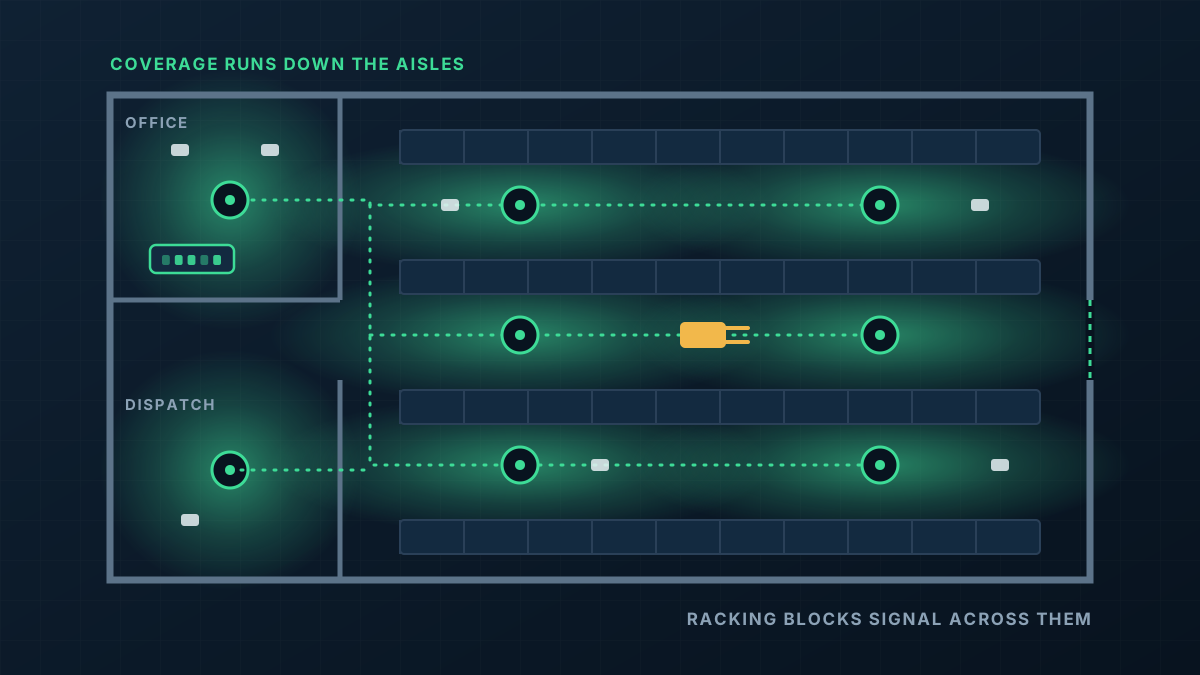
In a warehouse we design to the racking layout rather than the floor area. The aim is a clear path between each device and an access point wherever a picker or a forklift can be.
- 1
Access points positioned for the racking
Mounting positions and heights are chosen so signal travels along aisles instead of trying to punch through loaded racks.
- 2
Hardware suited to the environment
Access point models and mounting are selected for high ceilings, dust, heat under a steel roof and outdoor exposure at the docks.
- 3
Roaming that suits scanners
Handheld devices move constantly. The network is tuned so they hand over to the next access point cleanly rather than clinging to the last one.
- 4
Cabling and switching to match
Long runs and distant corners are planned with switches placed where they are needed, so every access point has a proper wired connection.
From first message to working network
Walk the site
Warehouses are quoted after seeing them. We look at racking, stock, roof height, mounting options and where the existing network equipment lives.
Design and quote
You receive a written quote covering access point positions, cabling routes and the switching behind them.
Install safely around operations
Work at height is planned with your site rules and traffic management, in sections so the warehouse keeps moving.
Test with your devices
We check coverage along the aisles using the scanners and terminals your team actually uses, then adjust.
What shapes the quote
Every building is different, so we quote each job on its own details rather than from a price list. These are the things that move it.
Get a Quote- Floor area, roof height and the racking layout
- What is stored and how full the racks run
- The devices that need to connect and the software they use
- Cable distances and whether extra switch locations are needed
- Access equipment required to work at height
- Outdoor areas such as docks, hardstand and gatehouses
Warehouse WiFi: common questions
Why does warehouse WiFi need a site visit?
Can you cover the yard as well?
Our racking layout changes. Is that a problem?
Will it work with our warehouse management system?
Get a Quote
Tell us what the building is and where the WiFi lets you down. A floor plan or a few photos helps if you have them, and we will ask for those when we call.
Thanks, that has come through
We will be in touch to talk through the site. If you would rather ring us, the number is 0485 001 498.
Rather talk it through?
Tell us what the building is, where the WiFi drops out and what is installed now. We will tell you what we would do about it.