Why Is My Office WiFi Slow?
Why is my office WiFi slow is usually asked right after someone has paid for a faster internet plan and seen no improvement. That is the clue: in most offices the internet connection is not the bottleneck. These are the seven causes we find most, and how to tell which one you have.
First, work out whether it is the WiFi at all
Plug a laptop into the network with a cable and run a speed test, then run the same test on WiFi from the desk that has the most trouble. If the cabled result is good and the wireless one is poor, the internet service is fine and the problem is inside the building. If both are poor, start with your internet provider.
1. Too many devices on too few access points
An access point shares its airtime among everything connected to it. Coverage can look perfect, with full signal bars everywhere, while the network crawls because forty devices are queuing for one access point. The giveaway is a network that is fast early in the morning and slow once everyone is in.
2. The access points are in the wrong places
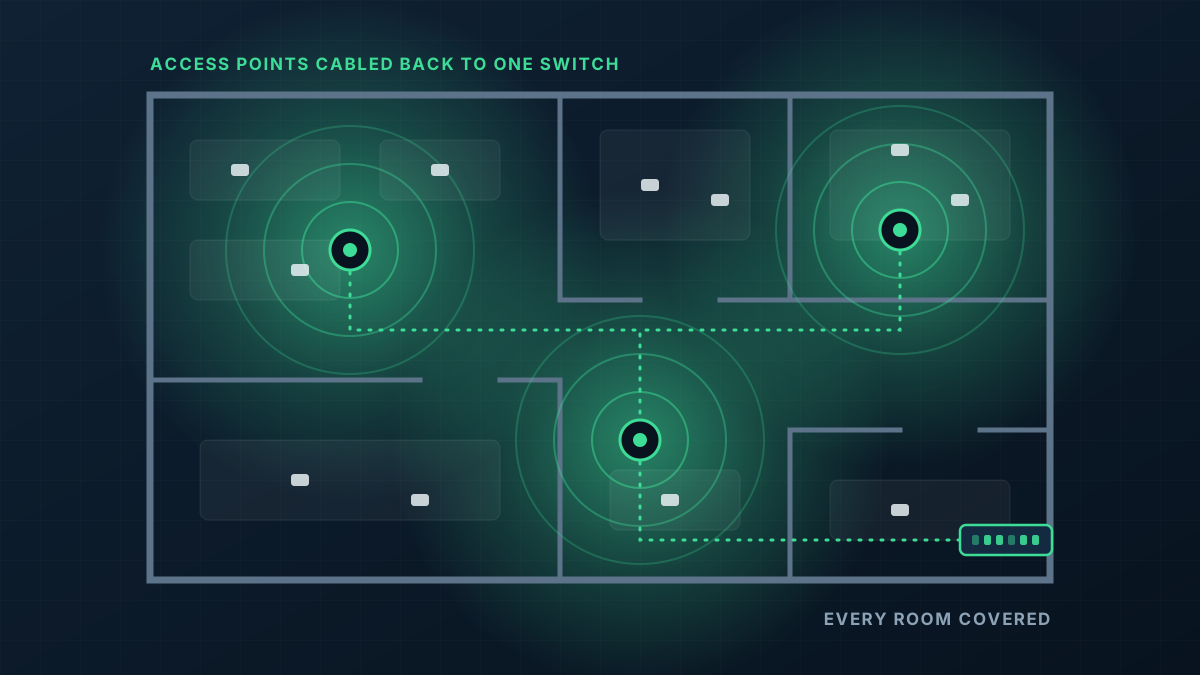
A router in the comms cupboard, or an access point above the reception desk, serves the rooms near it and not much else. Partitions, glass and a kitchen full of appliances all stand between it and the people at the far end.
3. Interference from the neighbours
In a multi-tenant building every tenancy has its own WiFi, and they all share the same airwaves. If your access points are left on automatic settings they can end up on the same channels as the office next door, and both networks slow down. Proper channel planning makes a real difference here.
4. Devices clinging to a distant access point
Laptops and phones decide for themselves when to switch access points, and many hold on to the first one they found long after a better one is in range. A network that is tuned for roaming nudges them across. One that is not leaves people on a weak, slow link while sitting under a perfectly good access point.
5. Wireless links between access points
If the access points connect to each other wirelessly instead of by cable, a share of their capacity is spent on that link. This is common where a consumer mesh kit has been stretched across an office.
6. A weak link in the wired network
The WiFi can only be as fast as what is behind it. An old switch, a damaged cable or a chain of small switches plugged into each other will throttle everything downstream. This one is easy to miss because the symptoms look like bad WiFi.
7. The internet provider's router is doing the lot
The modem-router supplied with an internet plan is designed for a household. Used as the firewall, the switch and the only access point for a business, it runs out of capacity quickly.
What actually fixes it
Most slow offices have two or three of these at once, and the fix is the same: enough access points, in the right places, each on its own cable, on sound switching, with channels and power set deliberately. That is what our office WiFi installation service delivers. If your network is already UniFi and simply misbehaving, managed WiFi may be all you need.