Guest WiFi for Venues, Shops and Accommodation
Guest WiFi lets customers and visitors get online without ever touching the network your tills, bookings and office computers run on. We install it for cafes, bars, clinics, showrooms, hotels and holiday accommodation, with a sign-in experience that suits the venue.
Signs the guest WiFi needs a rethink
The password is on a sticky note
One shared password for staff, tills and customers means every visitor's device is on the same network as your payment equipment.
A few guests slow everyone down
Without limits, a handful of people streaming video can take most of the connection away from the business.
Coverage stops at the counter
The outdoor seating, the function room or the far rooms of the motel are where guests sit, and where the signal gives up.
Complaints in the reviews
For accommodation in particular, poor WiFi is one of the first things guests mention, and one of the easier ones to fix.
Easy for guests, invisible to your systems
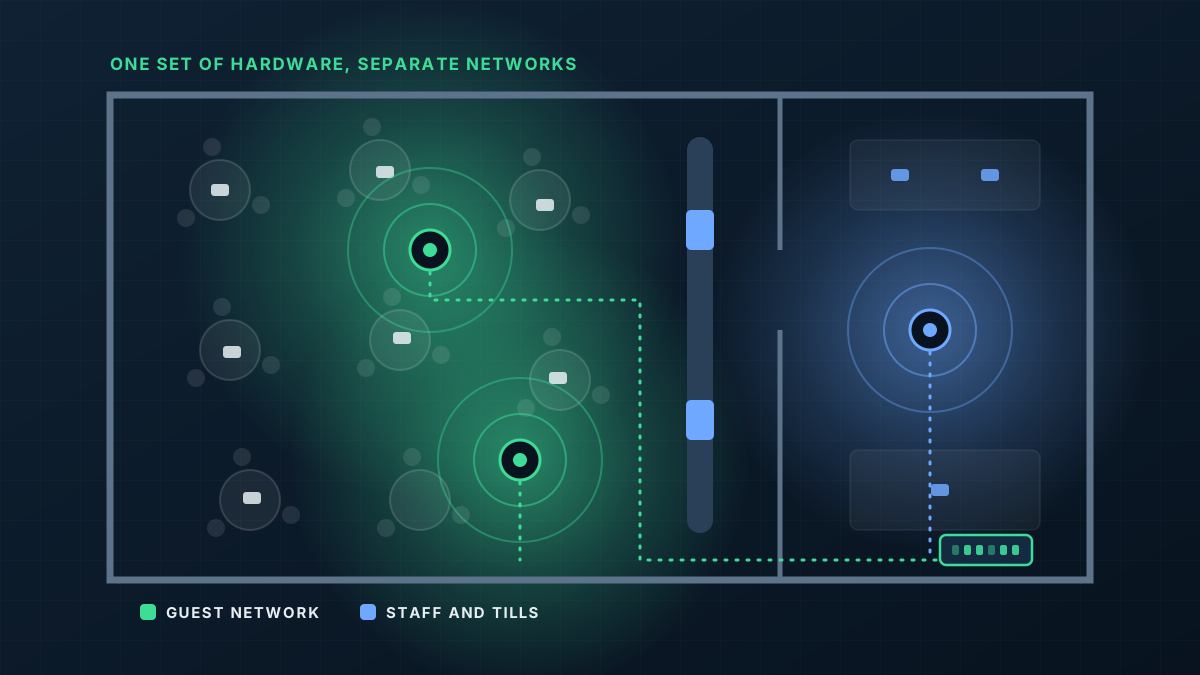
Guest WiFi is its own network, running over the same access points as everything else but walled off from it. Visitors reach the internet and nothing more.
- 1
A separate guest network
Guest devices are isolated from business equipment and from each other, so one visitor cannot see another's phone or your back office.
- 2
Sign-in that suits the venue
A simple password, a branded welcome page, or access codes that expire, which suits accommodation and paid access.
- 3
Fair shares of the connection
Speed limits per guest keep the network usable for everyone and protect the bandwidth your own systems rely on.
- 4
Coverage where guests actually are
Dining rooms, alfresco areas, function spaces and guest rooms are covered with access points chosen for each spot.
From first message to working network
Tell us about the venue
The kind of business, the areas guests use, roughly how many people at the busiest time, and what your tills and booking systems run on.
Design and quote
We set out access point positions, the networks to be created and how guests will sign in, in a written quote.
Install outside service
Cabling and mounting are scheduled around trading hours so the venue is not disrupted while guests are in.
Set up and show the team
We test in every guest area and show staff how to change the password or issue access codes.
What shapes the quote
Every building is different, so we quote each job on its own details rather than from a price list. These are the things that move it.
Get a Quote- The size of the venue and the number of separate areas or rooms
- How many guests are likely to be connected at the busiest time
- Indoor only, or outdoor seating and grounds as well
- The sign-in method you want
- Building construction, which matters a great deal in accommodation
- The internet service feeding it, since guest WiFi can only be as fast as the connection behind it
Guest WiFi: common questions
Is guest WiFi safe to run alongside our EFTPOS?
Can we put our branding on the sign-in page?
Can access expire automatically?
Do we need a faster internet plan?
Get a Quote
Tell us what the building is and where the WiFi lets you down. A floor plan or a few photos helps if you have them, and we will ask for those when we call.
Thanks, that has come through
We will be in touch to talk through the site. If you would rather ring us, the number is 0485 001 498.
Related services
Rather talk it through?
Tell us what the building is, where the WiFi drops out and what is installed now. We will tell you what we would do about it.