WiFi Installation That Covers the Whole Building
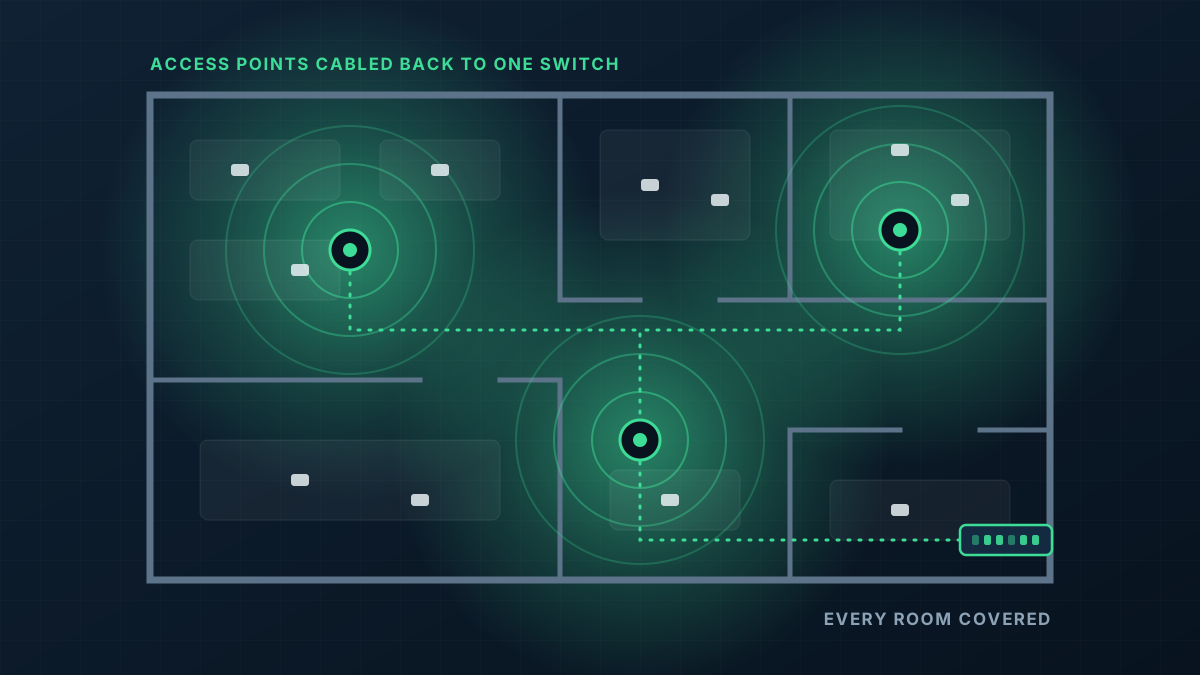
WiFi installation means putting access points where people actually use the network and cabling each one back to a switch, so every room is served by a device close by. We design the layout, run the cable, mount the hardware and configure it as one network for offices, warehouses, venues and homes.
When a single router has run out of road
Dead spots at the far end
The router sits where the internet comes in, usually a front office or a cupboard, and anything beyond a couple of walls gets a weak signal or none at all.
Extenders that made it worse
Plug-in boosters repeat a signal that is already weak, and each one adds another network name for devices to cling to as people move around.
Calls that drop when you walk
Phones and laptops hang on to a distant router instead of switching to something closer, so a video call stutters halfway down the corridor.
It slows down when the place fills up
One consumer router sharing its airtime between every laptop, phone, printer and TV runs out of capacity long before it runs out of range.
A wired backbone with WiFi on the end of it
Good WiFi is mostly cabling. Each access point gets its own network cable back to a central switch, which powers it and carries its traffic, so no access point depends on another one's signal.
- 1
Access points placed for the building
We position ceiling or wall access points from the floor plan and what the walls are made of, so coverage overlaps where people work rather than where a power point happens to be.
- 2
A cable to every access point
Each one is cabled back to a PoE switch, which sends power and data down the same cable. No plug packs, and no wireless hops between units.
- 3
One network name, automatic roaming
Every access point broadcasts the same network, and devices are handed from one to the next as people move through the building.
- 4
Separate networks where they matter
Guests, staff devices, payment terminals and smart devices can each sit on their own network, kept apart from one another.
From first message to working network
Tell us about the site
Send the address, a floor plan or a few photos, and where the trouble spots are. For larger or awkward buildings we arrange a visit before quoting.
Design and quote
We work out how many access points the building needs, where they go and how the cable gets there, then put that scope in a written quote.
Cable and mount
Cable is run through the ceiling space or wall cavities, access points are mounted, and the switch and gateway go in where your internet arrives.
Configure and test
We set up the networks and passwords, then walk the building checking signal and speed in the places you told us mattered.
What shapes the quote
Every building is different, so we quote each job on its own details rather than from a price list. These are the things that move it.
Get a Quote- How many access points the floor area, wall construction and number of users call for
- How hard the cable runs are: open ceiling space, solid ceilings, several storeys or separate buildings
- Whether there is existing data cabling in good enough condition to reuse
- The switch and gateway needed behind the access points
- Indoor coverage only, or outdoor areas as well
- Whether the work has to happen outside business hours
WiFi Installation: common questions
How many access points will I need?
Can you use the internet connection I already have?
Do you install mesh systems?
What hardware do you use?
How long does an install take?
Get a Quote
Tell us what the building is and where the WiFi lets you down. A floor plan or a few photos helps if you have them, and we will ask for those when we call.
Thanks, that has come through
We will be in touch to talk through the site. If you would rather ring us, the number is 0485 001 498.
Related services
Rather talk it through?
Tell us what the building is, where the WiFi drops out and what is installed now. We will tell you what we would do about it.