Home Network Setup With WiFi in Every Room
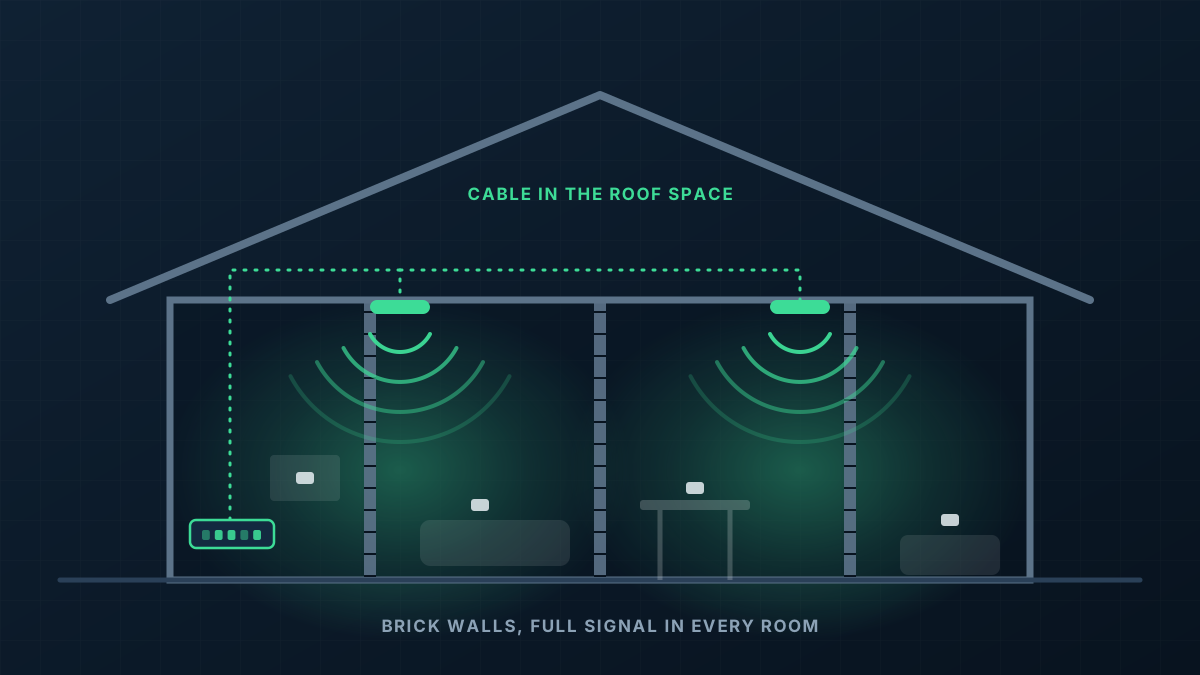
Home network setup done properly means WiFi that reaches the bedrooms, the home office and the alfresco, with wired points where a cable beats wireless. We cable ceiling access points through the roof space and tie them into one network that the whole household shares.
Why home WiFi falls short
The internet box is in the garage
Many homes have their connection point in the garage or a front corner, which is the worst possible place to broadcast WiFi from.
Solid walls soak up the signal
Brick and masonry internal walls weaken WiFi quickly. A router that covers a timber-framed house easily can struggle two rooms away in a brick one.
Work calls from home drop out
The home office is often the room furthest from the router, and it is the one where a frozen video call costs the most.
More devices every year
TVs, consoles, tablets, doorbells, speakers and solar monitoring all share the same router that was installed when there were four devices in the house.
The same method we use in offices, sized for a house
A home gets the same wired-backbone design as a commercial building, with fewer access points and tidier hardware. Everything is cabled, nothing relies on a booster.
- 1
Ceiling access points
Low-profile access points are mounted on the ceiling in central positions, each cabled back through the roof space. Most people stop noticing them within a week.
- 2
Wired points where it counts
Desks, TVs and gaming consoles get a data point so they are not competing for wireless airtime, which also frees up WiFi for everything else.
- 3
A small central hub
The gateway and switch sit together near the internet connection, in a cupboard, garage wall or small cabinet, with every cable labelled.
- 4
Coverage outside as well
Patios, pool areas, sheds and granny flats can be covered with an outdoor-rated access point on the same network.
From first message to working network
Send us the layout
A floor plan or a rough sketch, the wall type, where the internet comes in and which rooms give you trouble. Most homes can be quoted from that.
Design and quote
We mark up where the access points and data points would go and send a written quote for the lot.
Installation day
Cable goes through the roof space and down wall cavities, access points and wall plates are fitted, and the hub is set up.
Set up and walk through
We name the network, move your devices across, test each room and show you the app that controls it.
What shapes the quote
Every building is different, so we quote each job on its own details rather than from a price list. These are the things that move it.
Get a Quote- Size of the home, number of storeys and whether internal walls are brick or framed
- How accessible the roof space is, and whether there is a second storey with no cavity above the ground floor
- Number of access points and wired data points
- Outdoor areas, sheds or separate buildings to include
- Where the internet connection enters the house
Home Network Setup: common questions
Is this overkill for a house?
Do I have to change internet provider?
Can it be done in a two-storey home?
Will my smart home devices still connect?
What is the warranty?
Get a Quote
Tell us what the building is and where the WiFi lets you down. A floor plan or a few photos helps if you have them, and we will ask for those when we call.
Thanks, that has come through
We will be in touch to talk through the site. If you would rather ring us, the number is 0485 001 498.
Related services
Rather talk it through?
Tell us what the building is, where the WiFi drops out and what is installed now. We will tell you what we would do about it.